
2026 PARK JI HOON ASIA FANCON [RE:FLECT] in BANGKOK
Date
July 11, 2026
Time
5:00 PM
Place
IDEA LIVE BRAVO BKK
Ticket Price
5,900 / 4,900 / 3,900 / 2,900 (THB)
Ticket Open
28th June 2026 (SUN), from 10:00 AM (BKK time)
ซื้อบัตร / Buy Ticket ตรวจสอบรายการ / View Order สมัครสมาชิก / Register บัญชีของฉัน / My Accountคำถามที่พบบ่อย/FAQวิธีการซื้อบัตร/How to Buy Ticket
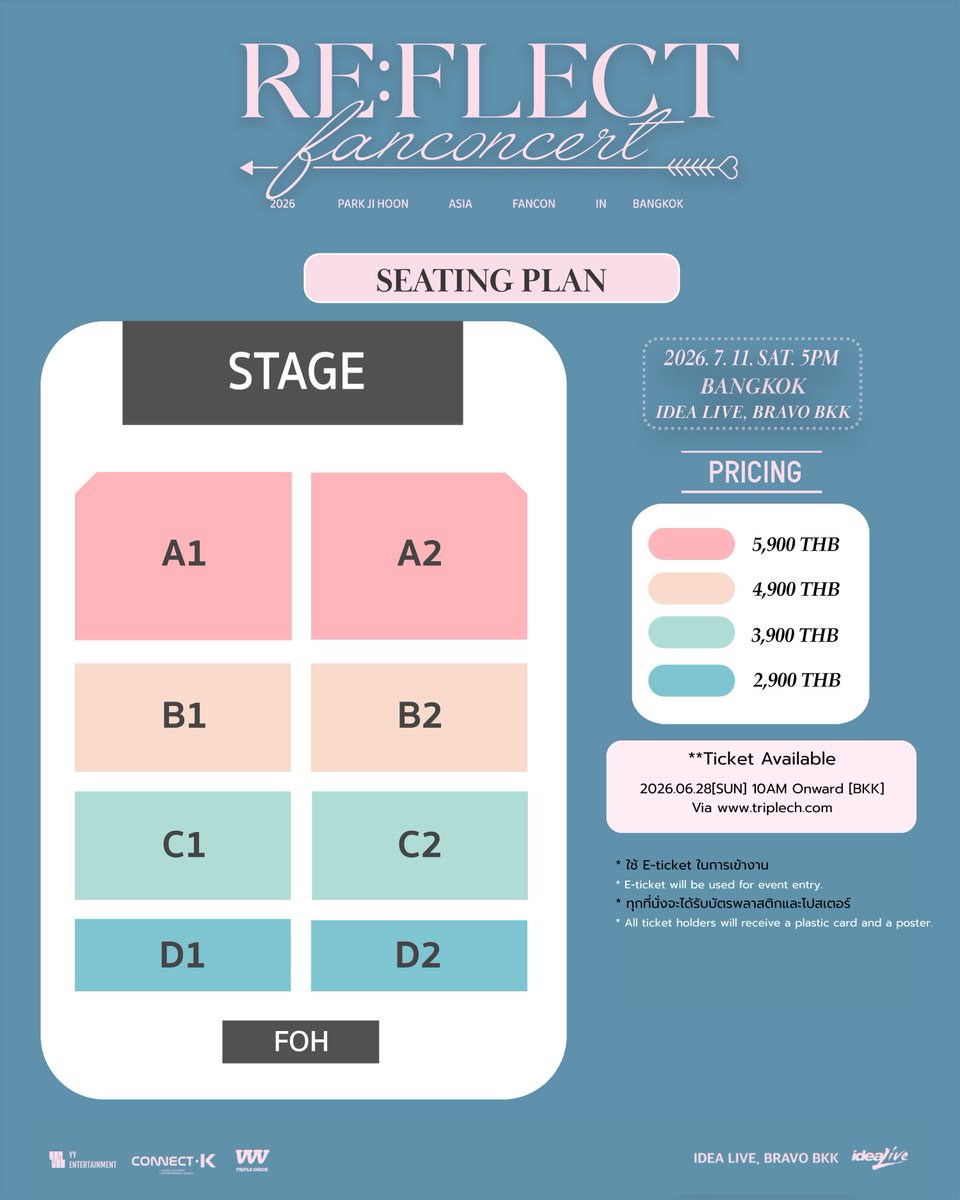
2026 PARK JI HOON ASIA FANCON [RE:FLECT] in BANGKOK✨
🗓️วันเสาร์ที่ 11 กรกฎาคม 2569
⏰เวลา 17:00 น.
📍สถานที่ : IDEA LIVE BRAVO BKK
🗓 เปิดจำหน่ายบัตร : วันอาทิตย์ที่ 28 มิถุนายน 2569 เวลา 10:00 น. เป็นต้นไป
🖥️ ช่องทางการจำหน่ายบัตร : http://triplech.com
💰ราคาบัตร : 5,900 / 4,900 / 3,900 / 2,900 (บาท)
Terms and Conditions รายละเอียดและขั้นตอนการสั่งซื้อ (เงื่อนไขและข้อกำหนด)
1. ผู้ที่ต้องการซื้อบัตร จะต้องเข้าไปลงทะเบียนสมัครสมาชิกที่หน้าเว็บไซต์หลัก http://www.triplech.com โปรดตรวจสอบความถูกต้องของข้อมูลส่วนตัวทั้งหมดก่อนกด "สมัครสมาชิก" ข้อมูลที่สมัครแล้วไม่สามารถเปลี่ยนแปลงได้
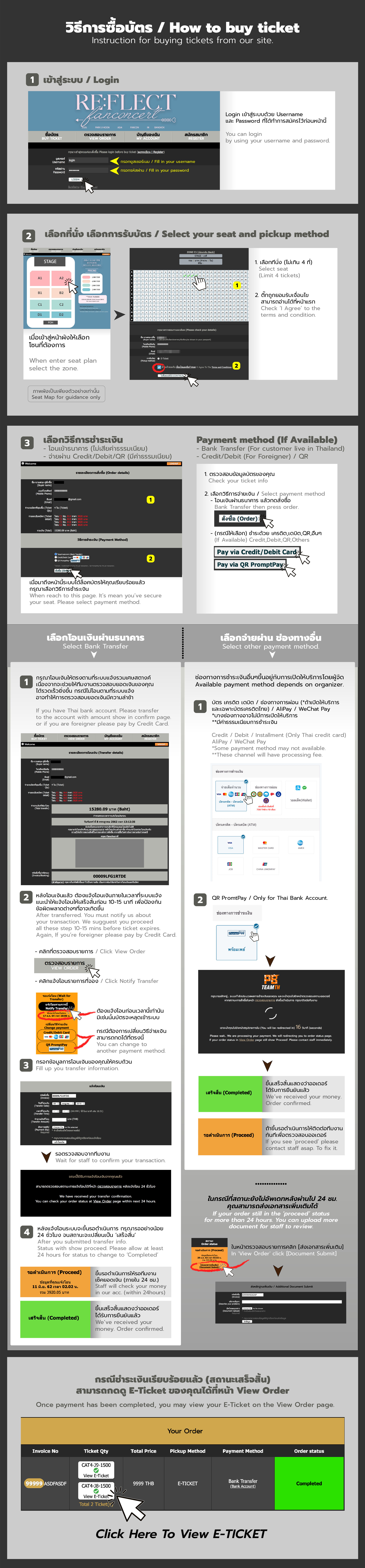
2. เมื่อเปิดจำหน่าย มีขั้นตอน ดังนี้
2.1. Login โดยใช้ User, Password ที่ลงทะเบียนไว้แล้ว
2.2. เลือกโซน ที่ต้องการ
2.3. เลือกที่นั่งที่ต้องการ จากนั้นกดที่ขั้นตอนถัดไป
2.4 เลือกวิธีการชำระเงิน แล้วกดสั่งซื้อ ท่านมีเวลาในการชำระเงินไม่เกิน 30 นาที* หากชำระเงินไม่ผ่าน สามารถเข้าเมนู “View My Order” เพื่อเลือกวิธีชำระแบบอื่นหรือทำการชำระใหม่
2.4.0 กรณีเลือกชำระด้วยการโอนเงิน มีขั้นตอนดังนี้
a) ระบบจะสรุปรายละเอียดการซื้อ และจำนวนเงินที่ท่านต้องโอนมาให้ ท่านมีเวลาดำเนินการโอนเงินและแจ้งโอนในเวลาที่ระบบแจ้งเท่านั้น
b) ท่านสามารถโอนเงินผ่าน เคาน์เตอร์ธนาคาร, ตู้ ATM , CDM, Internet Banking หรือ Mobile Banking เพื่อเข้าบัญชีที่ระบบกำหนดแจ้งไว้ทันที (ไม่รองรับการโอนด้วย True Wallet)
c) หลังการโอนเงินท่านต้องไปที่หน้า "ตรวจสอบรายการ" เพื่อคลิก "แจ้งโอนรายการนี้" และต้องกรอกข้อมูลแจ้งโอนร่วมกับการอัพภาพสลิปโดยเร็วที่สุดก่อนหมดเวลาอย่างน้อย 5-10 นาที เพื่อให้สถานะเป็น "รอดำเนินการ" จากนั้นแคปเจอร์หน้าตรวจสอบรายการที่สถานะเป็นรอดำเนินการไว้เพื่อติดตามกับระบบ เลขที่สั่งซื้อที่สถานะไม่ใช่ "รอดำเนินการ" จะถูกระบบลบทิ้งทันทีที่หมดเวลาแจ้งโอน (เวลาสิ้นสุดการแจ้งโอนระบุในสถานะของเลขที่สั่งซื้อ) (ประมาณ 30 นาที)
d) กรณีที่ท่านไม่แจ้งโอนในระบบก่อนหมดเวลา ทำให้เลขที่สั่งซื้อนั้นถูกลบทิ้ง หากท่านโอนเงินไปแล้ว ท่านต้องกดจองที่นั่งใหม่ในราคาเดิมด้วยยอดเงินตามที่ท่านโอนเข้าไปในระบบ และแจ้งโอนตามขั้นตอนที่หน้า "ตรวจสอบรายการ" เท่านั้น ในกรณีนี้ ระบบไม่สามารถคืนเงินได้หากผู้จัดงานไม่มีการประกาศ SOLD OUT และ/หรือ ผู้จัดงานไม่อนุมัติในการคืนเงิน
2.4.1 กรณีเลือกชำระผ่านบัตรเครดิต, เดบิต, ผ่อนชำระ จะเข้าสู่การชำระด้วยระบบ ( มีค่า Convenience Fee เพิ่มเติม 4%) เลขที่สั่งซื้อที่ชำระผ่านระบบเรียบร้อยจะมีสถานะเป็น "เสร็จสิ้น" ทันที ไม่ต้องแจ้งโอน หากชำระไม่สำเร็จ หรือต้องการเปลี่ยนบัตร ให้ไปที่เมนู View Order เพื่อชำระอีกครั้ง โดยต้องชำระก่อนหมดเวลาออเดอร์อย่างน้อย 15 นาที
2.4.2 กรณีเลือกชำระผ่าน QRCode / Prompt Pay จะเข้าสู่การชำระด้วยระบบ ท่านสามารถชำระผ่าน Application ของทุกธนาคารไทย ( มีค่า Convenience Fee เพิ่มเติม 2%) เลขที่สั่งซื้อที่ชำระผ่านระบบเรียบร้อยจะมีสถานะเป็น "เสร็จสิ้น" ทันที ไม่ต้องแจ้งโอน หากชำระไม่สำเร็จ หรือต้องการเปลี่ยนบัตร ให้ไปที่เมนู View Order เพื่อชำระอีกครั้ง โดยต้องชำระก่อนหมดเวลาออเดอร์อย่างน้อย 15 นาที
2.5 ในการจองบัตร 1 ครั้ง จะสามารถจองได้ครั้งละ 1-4 ใบ ในรอบเดียวกันเท่านั้น หากตรวจพบการจองเข้ามาอย่างผิดปกติไม่ว่าจะในรูปแบบใดก็ตาม ทีมงานขอสงวนสิทธิ์การยกเลิกออเดอร์โดยไม่ต้องแจ้งให้ทราบล่วงหน้า และไม่คืนเงิน
3. ราคาบัตรนี้ ยังไม่รวมค่าดำเนินการ ใบละ 40 บาท บัตรงานนี้อยู่ในรูปแบบ ETicket ซึ่งจะแสดงในหน้า View Order ก่อนงานประมาณ 7 วัน
4. หลังจากที่ผู้จองกดส่งข้อมูลการจองแล้ว ผู้จองไม่สามารถแก้ไขข้อมูลการจอง หรือยกเลิกการจองได้ทุกกรณี และทางทีมงานไม่สามารถทำการคืนเงินได้ หากท่านไม่สามารถมาร่วมชมการแสดง หลังจากที่ได้ซื้อบัตรไปแล้ว
5. โปรดทราบว่าเว็บไซต์นี้ เป็นตัวแทนจำหน่ายที่ได้รับอนุญาตแต่เพียงผู้เดียว บัตรเข้าชมงานไม่สามารถนำไปเสนอขายต่อเกินราคาได้ หากท่านไม่ปฏิบัติตามเงื่อนไข บัตรของท่านอาจถูกยกเลิกโดยไม่ได้รับเงินคืน บัตรที่ซื้อจากเว็บไซต์อื่นๆ หรือ บุคคลที่สามและผู้จัดจำหน่ายที่ไม่ได้รับอนุญาต เช่น Viagogo, Stubhub หรือที่คล้ายกันนี้ จะถือเป็นโมฆะและไม่สามารถใช้เข้าชมงานได้
6. เว็บไซต์นี้จัดทำภายในการดำเนินงานของ บริษัท Triple Check TH ระบบบัตรดำเนินการโดย PBTeam
หมายเหตุ:
ติดตาม และสอบถามเพิ่มเติมเกี่ยวกับกิจกรรม
https://x.com/TriplecheckTH
https://instagram.com/triplecheckth
https://facebook.com/Triplecheckth
ติดต่อทีมบัตร / เว็บไซต์
Line @PBTicketTeam1 https://line.me/R/ti/p/%40pbticketteam1
Email pbticketteam@gmail.com
2026 PARK JI HOON ASIA FANCON [RE:FLECT] in BANGKOK✨
🗓️ July 11, 2026
⏰ 5:00 PM
📍 IDEA LIVE BRAVO BKK
🗓 Ticket Sales Open: 28th June 2026 (SUN), from 10:00 AM (BKK time)
🖥️ Tickets available at: http://triplech.com
💰Ticket prices : 5,900 / 4,900 / 3,900 / 2,900 (THB)
Terms and Condition
1. The Buyers have to apply for membership at http://www.triplech.com Please check the accuracy of all personal information before pressing ‘Register’. The registered information cannot be changed.
2. While processing ticket purchase, please follow the steps below;
2.1. Login using a registered User, Password.
2.2. Choose Seating Zone
2.3. Choose your Seat,
2.4. Choose payment method
2.4.0. Bank Transfer
a) System will provide all order summary (the Reservation code, Total Payment Value, the Bank Account Details and time frame that the member has to pay for the ticket).
b) You can make payment or transfer via Bank Counter, ATM, CDM, Internet Banking, Mobile Banking, any Bank's application which immediately transfer. (Do not support app True Wallet)
c) After the payment is made, you need to capture the payment slip. DO NOT forget to go back to 'View Orders' menu and confirm date/time of money transferred at within the given time frame and upload Payment Slip photo. Otherwise, it will be considered that the member cancel the reservation. So, the reservation will be automatically cancelled from the system. The organizer will not be responsible on this cancellation.
d) In case you do not submit transfer information within time frame and the reservation was cancelled. You have to make new reservation and submit the transfer information immediately. There's no refund if tickets do not officially SOLD OUT / or the Organizer do not approve refund.
2.4.1. For credit or debit card payments, the transaction will be processed through the system with an additional 4% Convenience Fee. Once the order is successfully paid, it will be marked as "Completed" instantly. No need to inform about the transfer. If payment fails or if you want to change the card, go to the "View Order" menu to make another payment. Payment must be made within 15 minutes after making a ticket reservation.
2.4.2 For QR Code / Prompt Pay payments, you can pay using the application of any Thai bank with an additional 2% Convenience Fee. Once the order is successfully paid through the system, it will be marked as "Completed" instantly. No need to inform about the transfer. If payment fails or if you want to change the card, go to the "View Order" menu to make another payment. Payment must be made within 15 minutes after making a ticket reservation.
2.5 You can reserve up to 4 seats and must be in the same round. (If the member would like to reserve another round, he/she may have additional reservation with the same username.) If a reservation has been detected abnormally OR use any scripts to reserve tickets. The team reserves the rights to cancel orders without prior notice and no refund.
3. Ticket price is EXCLUDED the system fee for 40 THB per ticket. This event ticket is an E-Ticket, which will be available on your 'View Order' page approximately 7 days before the event.
4. After the reservation is submitted, the member is not allowed to change any reservation details and cannot cancel the reservation in any cases with no refund.
5. Please note that this website is the only authorized distributor. Tickets purchased cannot be resold, refunded, exchanged, cannot be transferred or resold to others. The organizer reserves the right to cancel the ticket with no prior notice and with no refund or other compensation. Tickets purchased from other websites or third parties and unauthorized distributors such as Viagogo, Stubhub or similar will be considered void and cannot be used to visit the event.
6. This website is operated under Triple Check TH Co.,Ltd. Ticketing System powered by PBTeam.
For more information about the event
https://x.com/TriplecheckTH
https://instagram.com/triplecheckth
https://facebook.com/Triplecheckth
Website Team
Line @PBTicketTeam1 https://line.me/R/ti/p/%40pbticketteam1
Email pbticketteam@gmail.com
🗓️วันเสาร์ที่ 11 กรกฎาคม 2569
⏰เวลา 17:00 น.
📍สถานที่ : IDEA LIVE BRAVO BKK
🗓 เปิดจำหน่ายบัตร : วันอาทิตย์ที่ 28 มิถุนายน 2569 เวลา 10:00 น. เป็นต้นไป
🖥️ ช่องทางการจำหน่ายบัตร : http://triplech.com
💰ราคาบัตร : 5,900 / 4,900 / 3,900 / 2,900 (บาท)
Terms and Conditions รายละเอียดและขั้นตอนการสั่งซื้อ (เงื่อนไขและข้อกำหนด)
1. ผู้ที่ต้องการซื้อบัตร จะต้องเข้าไปลงทะเบียนสมัครสมาชิกที่หน้าเว็บไซต์หลัก http://www.triplech.com โปรดตรวจสอบความถูกต้องของข้อมูลส่วนตัวทั้งหมดก่อนกด "สมัครสมาชิก" ข้อมูลที่สมัครแล้วไม่สามารถเปลี่ยนแปลงได้
2. เมื่อเปิดจำหน่าย มีขั้นตอน ดังนี้
2.1. Login โดยใช้ User, Password ที่ลงทะเบียนไว้แล้ว
2.2. เลือกโซน ที่ต้องการ
2.3. เลือกที่นั่งที่ต้องการ จากนั้นกดที่ขั้นตอนถัดไป
2.4 เลือกวิธีการชำระเงิน แล้วกดสั่งซื้อ ท่านมีเวลาในการชำระเงินไม่เกิน 30 นาที* หากชำระเงินไม่ผ่าน สามารถเข้าเมนู “View My Order” เพื่อเลือกวิธีชำระแบบอื่นหรือทำการชำระใหม่
2.4.0 กรณีเลือกชำระด้วยการโอนเงิน มีขั้นตอนดังนี้
a) ระบบจะสรุปรายละเอียดการซื้อ และจำนวนเงินที่ท่านต้องโอนมาให้ ท่านมีเวลาดำเนินการโอนเงินและแจ้งโอนในเวลาที่ระบบแจ้งเท่านั้น
b) ท่านสามารถโอนเงินผ่าน เคาน์เตอร์ธนาคาร, ตู้ ATM , CDM, Internet Banking หรือ Mobile Banking เพื่อเข้าบัญชีที่ระบบกำหนดแจ้งไว้ทันที (ไม่รองรับการโอนด้วย True Wallet)
c) หลังการโอนเงินท่านต้องไปที่หน้า "ตรวจสอบรายการ" เพื่อคลิก "แจ้งโอนรายการนี้" และต้องกรอกข้อมูลแจ้งโอนร่วมกับการอัพภาพสลิปโดยเร็วที่สุดก่อนหมดเวลาอย่างน้อย 5-10 นาที เพื่อให้สถานะเป็น "รอดำเนินการ" จากนั้นแคปเจอร์หน้าตรวจสอบรายการที่สถานะเป็นรอดำเนินการไว้เพื่อติดตามกับระบบ เลขที่สั่งซื้อที่สถานะไม่ใช่ "รอดำเนินการ" จะถูกระบบลบทิ้งทันทีที่หมดเวลาแจ้งโอน (เวลาสิ้นสุดการแจ้งโอนระบุในสถานะของเลขที่สั่งซื้อ) (ประมาณ 30 นาที)
d) กรณีที่ท่านไม่แจ้งโอนในระบบก่อนหมดเวลา ทำให้เลขที่สั่งซื้อนั้นถูกลบทิ้ง หากท่านโอนเงินไปแล้ว ท่านต้องกดจองที่นั่งใหม่ในราคาเดิมด้วยยอดเงินตามที่ท่านโอนเข้าไปในระบบ และแจ้งโอนตามขั้นตอนที่หน้า "ตรวจสอบรายการ" เท่านั้น ในกรณีนี้ ระบบไม่สามารถคืนเงินได้หากผู้จัดงานไม่มีการประกาศ SOLD OUT และ/หรือ ผู้จัดงานไม่อนุมัติในการคืนเงิน
2.4.1 กรณีเลือกชำระผ่านบัตรเครดิต, เดบิต, ผ่อนชำระ จะเข้าสู่การชำระด้วยระบบ ( มีค่า Convenience Fee เพิ่มเติม 4%) เลขที่สั่งซื้อที่ชำระผ่านระบบเรียบร้อยจะมีสถานะเป็น "เสร็จสิ้น" ทันที ไม่ต้องแจ้งโอน หากชำระไม่สำเร็จ หรือต้องการเปลี่ยนบัตร ให้ไปที่เมนู View Order เพื่อชำระอีกครั้ง โดยต้องชำระก่อนหมดเวลาออเดอร์อย่างน้อย 15 นาที
2.4.2 กรณีเลือกชำระผ่าน QRCode / Prompt Pay จะเข้าสู่การชำระด้วยระบบ ท่านสามารถชำระผ่าน Application ของทุกธนาคารไทย ( มีค่า Convenience Fee เพิ่มเติม 2%) เลขที่สั่งซื้อที่ชำระผ่านระบบเรียบร้อยจะมีสถานะเป็น "เสร็จสิ้น" ทันที ไม่ต้องแจ้งโอน หากชำระไม่สำเร็จ หรือต้องการเปลี่ยนบัตร ให้ไปที่เมนู View Order เพื่อชำระอีกครั้ง โดยต้องชำระก่อนหมดเวลาออเดอร์อย่างน้อย 15 นาที
2.5 ในการจองบัตร 1 ครั้ง จะสามารถจองได้ครั้งละ 1-4 ใบ ในรอบเดียวกันเท่านั้น หากตรวจพบการจองเข้ามาอย่างผิดปกติไม่ว่าจะในรูปแบบใดก็ตาม ทีมงานขอสงวนสิทธิ์การยกเลิกออเดอร์โดยไม่ต้องแจ้งให้ทราบล่วงหน้า และไม่คืนเงิน
3. ราคาบัตรนี้ ยังไม่รวมค่าดำเนินการ ใบละ 40 บาท บัตรงานนี้อยู่ในรูปแบบ ETicket ซึ่งจะแสดงในหน้า View Order ก่อนงานประมาณ 7 วัน
4. หลังจากที่ผู้จองกดส่งข้อมูลการจองแล้ว ผู้จองไม่สามารถแก้ไขข้อมูลการจอง หรือยกเลิกการจองได้ทุกกรณี และทางทีมงานไม่สามารถทำการคืนเงินได้ หากท่านไม่สามารถมาร่วมชมการแสดง หลังจากที่ได้ซื้อบัตรไปแล้ว
5. โปรดทราบว่าเว็บไซต์นี้ เป็นตัวแทนจำหน่ายที่ได้รับอนุญาตแต่เพียงผู้เดียว บัตรเข้าชมงานไม่สามารถนำไปเสนอขายต่อเกินราคาได้ หากท่านไม่ปฏิบัติตามเงื่อนไข บัตรของท่านอาจถูกยกเลิกโดยไม่ได้รับเงินคืน บัตรที่ซื้อจากเว็บไซต์อื่นๆ หรือ บุคคลที่สามและผู้จัดจำหน่ายที่ไม่ได้รับอนุญาต เช่น Viagogo, Stubhub หรือที่คล้ายกันนี้ จะถือเป็นโมฆะและไม่สามารถใช้เข้าชมงานได้
6. เว็บไซต์นี้จัดทำภายในการดำเนินงานของ บริษัท Triple Check TH ระบบบัตรดำเนินการโดย PBTeam
หมายเหตุ:
ติดตาม และสอบถามเพิ่มเติมเกี่ยวกับกิจกรรม
https://x.com/TriplecheckTH
https://instagram.com/triplecheckth
https://facebook.com/Triplecheckth
ติดต่อทีมบัตร / เว็บไซต์
Line @PBTicketTeam1 https://line.me/R/ti/p/%40pbticketteam1
Email pbticketteam@gmail.com
2026 PARK JI HOON ASIA FANCON [RE:FLECT] in BANGKOK✨
🗓️ July 11, 2026
⏰ 5:00 PM
📍 IDEA LIVE BRAVO BKK
🗓 Ticket Sales Open: 28th June 2026 (SUN), from 10:00 AM (BKK time)
🖥️ Tickets available at: http://triplech.com
💰Ticket prices : 5,900 / 4,900 / 3,900 / 2,900 (THB)
Terms and Condition
1. The Buyers have to apply for membership at http://www.triplech.com Please check the accuracy of all personal information before pressing ‘Register’. The registered information cannot be changed.
2. While processing ticket purchase, please follow the steps below;
2.1. Login using a registered User, Password.
2.2. Choose Seating Zone
2.3. Choose your Seat,
2.4. Choose payment method
2.4.0. Bank Transfer
a) System will provide all order summary (the Reservation code, Total Payment Value, the Bank Account Details and time frame that the member has to pay for the ticket).
b) You can make payment or transfer via Bank Counter, ATM, CDM, Internet Banking, Mobile Banking, any Bank's application which immediately transfer. (Do not support app True Wallet)
c) After the payment is made, you need to capture the payment slip. DO NOT forget to go back to 'View Orders' menu and confirm date/time of money transferred at within the given time frame and upload Payment Slip photo. Otherwise, it will be considered that the member cancel the reservation. So, the reservation will be automatically cancelled from the system. The organizer will not be responsible on this cancellation.
d) In case you do not submit transfer information within time frame and the reservation was cancelled. You have to make new reservation and submit the transfer information immediately. There's no refund if tickets do not officially SOLD OUT / or the Organizer do not approve refund.
2.4.1. For credit or debit card payments, the transaction will be processed through the system with an additional 4% Convenience Fee. Once the order is successfully paid, it will be marked as "Completed" instantly. No need to inform about the transfer. If payment fails or if you want to change the card, go to the "View Order" menu to make another payment. Payment must be made within 15 minutes after making a ticket reservation.
2.4.2 For QR Code / Prompt Pay payments, you can pay using the application of any Thai bank with an additional 2% Convenience Fee. Once the order is successfully paid through the system, it will be marked as "Completed" instantly. No need to inform about the transfer. If payment fails or if you want to change the card, go to the "View Order" menu to make another payment. Payment must be made within 15 minutes after making a ticket reservation.
2.5 You can reserve up to 4 seats and must be in the same round. (If the member would like to reserve another round, he/she may have additional reservation with the same username.) If a reservation has been detected abnormally OR use any scripts to reserve tickets. The team reserves the rights to cancel orders without prior notice and no refund.
3. Ticket price is EXCLUDED the system fee for 40 THB per ticket. This event ticket is an E-Ticket, which will be available on your 'View Order' page approximately 7 days before the event.
4. After the reservation is submitted, the member is not allowed to change any reservation details and cannot cancel the reservation in any cases with no refund.
5. Please note that this website is the only authorized distributor. Tickets purchased cannot be resold, refunded, exchanged, cannot be transferred or resold to others. The organizer reserves the right to cancel the ticket with no prior notice and with no refund or other compensation. Tickets purchased from other websites or third parties and unauthorized distributors such as Viagogo, Stubhub or similar will be considered void and cannot be used to visit the event.
6. This website is operated under Triple Check TH Co.,Ltd. Ticketing System powered by PBTeam.
For more information about the event
https://x.com/TriplecheckTH
https://instagram.com/triplecheckth
https://facebook.com/Triplecheckth
Website Team
Line @PBTicketTeam1 https://line.me/R/ti/p/%40pbticketteam1
Email pbticketteam@gmail.com
คำถามที่พบบ่อย/F.A.Q
คำถามที่พบบ่อย/F.A.Q
Ticket FAQ
Q1 : สมัครสมาชิกในเว็บไซต์อย่างไร / ใช้ข้อมูลอะไรบ้าง / มีค่าใช้จ่ายหรือไม่?
A1 : การสมัครสมาชิกในเว็บไซต์ สมัครได้ที่เมนู ‘สมัครสมาชิก’ โดยใช้ข้อมูลดังต่อไปนี้ Username ที่ต้องการ (ตัวอักษรเท่านั้น ห้ามมีเว้นวรรคหรืออักษรพิเศษ), Password, ชื่อ-นามสกุลตามบัตรประชาชน (หรือพาสปอร์ต), เพศ, ปีเกิด, ที่อยู่สำหรับจัดส่งเอกสาร, เบอร์โทรศัพท์, อีเมลที่ติดต่อได้ (สมัครฟรีไม่เสียค่าใช้จ่ายใดๆ)
- หลังการสมัคร ท่านจะได้รับอีเมลจากระบบ ส่ง link ให้ท่านคลิกเพื่อ activate ยืนยันให้ user ของท่านใช้งานได้ โดยผู้สมัครจะมี user และ password ของตนเอง เพื่อนำไปใช้ในการซื้อบัตรหรือร่วมกิจกรรมอื่นๆต่อไป
- สำหรับท่านที่ไม่ได้รับ automail ในการยืนยันการสมัคร ให้ลองสมัครใหม่โดยใช้อีเมลเดิม ระบบจะทำการส่งอีเมลเพื่อยืนยันตัวซ้ำไปอีกครั้งโดยอัตโนมัติ ถ้าเป็นไปได้กรุณาใช้ gmail ในการลงทะเบียนจะพบปัญหาน้อยที่สุด
- เมื่อสมัครเรียบร้อยแล้ว แนะนำให้ทดสอบ log in ที่เมนู ‘บัญชีของฉัน’ โดยใช้ User, Password ของท่าน เพื่อตรวจสอบผลการสมัคร
- กรุณาตรวจสอบความถูกต้องของข้อมูลส่วนตัวทั้งหมดที่ใช้ในการสมัคร ข้อมูลนี้จะไม่สามารถเปลี่ยนแปลงได้
Q2 : ลืม User / Password ทำอย่างไร?
A2 : กด ‘ลืมรหัสผ่าน’ ระบบจะให้ระบุอีเมลที่ใช้สมัคร และระบบจะส่งอีเมลเพื่อใช้ในการรีเซ็ต password พร้อมแจ้ง User ที่ท่านใช้สมัครไปพร้อมกัน ไม่สามารถส่งลิ้งก์รีเซ็ตรหัสผ่านไปในช่องทางอื่นนอกเหนือจากอีเมลที่ใช้สมัครของยูสเซอร์นั้น ๆ
Q3 : เวลาของระบบเป็นเวลาเท่าไหร่ เทียบเวลาได้ที่ไหน?
A3 : ระบบตั้งเวลามาตรฐานตรงตามกรมอุทกศาสตร์ สามารถเทียบเวลาได้ที่ โทร 1811
Q4 : ในวันจอง สามารถ Log in ก่อนเวลาจองได้หรือไม่?
A4 : สำหรับท่านที่สมัครสมาชิกไว้แล้ว ท่านสามารถล็อคอินได้ที่หน้า 'ตรวจสอบรายการ' โดยระบบจะเปิดให้ทดลอง Log in ก่อนเวลาเปิดจองบัตรประมาณ 1 ชม. และก่อนถึงเวลาเปิดจองประมาณ 10-15 นาที ให้ท่านรีเฟรชหน้าดังกล่าว และล็อคอินอีกครั้งเพื่อเตรียมกดที่เมนู "ซื้อบัตร" ตามเวลาที่ระบบกำหนด
- ในช่วงก่อนเวลาเปิดจองบัตร 1 ชม. หากท่านเข้าเว็บไซต์แล้วยังไม่เห็นเมนู 'ซื้อบัตร (Buy Ticket)' ให้ลบ history ลบคุกกี้จากอุปกรณ์ของท่าน แล้วเข้าเว็บไซต์อีกครั้ง
Q5 : 1 User สามารถ Log in ได้จากหลายเครื่องหรือไม่?
A5 : 1 User สามารถ Log in เข้าใช้งานพร้อมกันได้มากกว่า 1 เครื่อง แต่ไม่แนะนำ เพราะอาจเกิดการจองซ้ำซ้อนใน user เดียวกัน หากระบบตรวจสอบพบการจองจาก user เดียวกันเข้ามากผิดปกติ อาจจะถูกตรวจสอบ / สอบถามเพิ่มเติม / พิจารณายกเลิกออเดอร์ หรืออื่น ๆ
- User ที่มีออเดอร์กดจองโดยที่ไม่โอนเงินจะถูกเจ้าหน้าที่ระบบพิจารณาอย่างใกล้ชิด หากตรวจสอบพบว่าเป็นความตั้งใจ อาจถูกแบนยูสเซอร์ในลำดับถัดไป
Q6 : ในการจองบัตร 1 ครั้ง สามารถจองได้กี่ใบ / กี่โซน / 1 User จองได้กี่ใบ?
A6 : ในการจองบัตร 1 ครั้ง จะสามารถจองได้ครั้งละ 1-4 ใบ ในรอบและโซนเดียวกันเท่านั้น หากต้องการโซนอื่นด้วย ให้ทำการจองเข้ามาใหม่อีกครั้ง
- ก่อนการกดจองบัตร โปรดพิจารณาจำนวนบัตรที่ท่านเลือกให้ถี่ถ้วน เพราะเมื่อกดจองแล้วจะไม่สามารถเปลี่ยนแปลงจำนวนได้ การโอนเงินต้องโอนพร้อมกันทั้งออเดอร์ไม่สามารถโอนเพียงใบใดใบหนึ่งได้ ถ้าท่านโอนไม่ครบ หากเจ้าหน้าที่อาจพิจารณายกเลิกออเดอร์ ท่านต้องกดบัตรใหม่ในรอบที่หลุดรอบถัดไปให้เท่ากับยอดเงินที่ท่านโอนเข้ามา ซึ่งจะทำให้ท่านเสียสิทธิในที่ดี ๆ ที่ท่านเคยกดได้
Q7 : จองบัตรเสร็จแล้ว ไม่ได้จดเลขที่ใบสั่งซื้อ / บัญชี / ที่นั่ง / เวลาสิ้นสุดแจ้งโอน / ยอดเงิน ดูได้ที่ไหน?
A7 : ท่านจะได้รับแจ้ง เลขที่สั่งซื้อ เลขบัญชี เวลาสิ้นสุดการแจ้งโอน ในหน้าสุดท้ายหลังการจองสำเร็จ ท่านสามารถตรวจสอบข้อมูลการจองของท่านได้ที่เมนู ‘ตรวจสอบรายการ (View Order)’
Q11 : เลือกชำระเงินด้วยบัตรเครดิต/ เดบิต แล้วระบบจะเป็นอย่างไร / ตัดบัตรไม่ผ่าน / กรอกข้อมูลบัตรผิด ทำอย่างไร?
A11 : กรณีเลือกชำระด้วยบัตรเครดิต/ เดบิต หากระบบสามารถตัดยอดชำระได้ตามขั้นตอน สถานะของออเดอร์นั้นจะเป็น 'เสร็จสิ้น (Complete)' ทันที
- หากระบบไม่สามารถตัดยอดบัตรเครดิตไม่ว่าด้วยกรณีใด ๆ ท่านสามารถเลือกวิธีชำระเงินได้อีกครั้งที่หน้าตรวจสอบรายการ ดังนี้
- เปลี่ยนเป็น ‘โอนเงิน(Bank Transfer)’ ท่านต้องดำเนินการโอนเงิน และแจ้งโอนผ่านระบบที่หน้าตรวจสอบรายการตามข้อ Q9
- เลือกชำระด้วยบัตรเครดิตอีกครั้ง ให้เลือก ‘จ่ายด้วยบัตรเครดิต’ ทันที ในออเดอร์นั้น
- เลขที่สั่งซื้อที่ชำระด้วยบัตรเครดิต ที่สถานะไม่เป็น 'เสร็จสิ้น (Complete)' จะถูกลบเมื่อครบเวลาที่ระบุในสถานะของแต่ละเลขที่สั่งซื้อ
Q14 : รายชื่อผู้โชคดี / กติกาและสิ่งของต้องห้ามในการเข้าชม / จุดรับฝากของศิลปิน / สินค้าออฟฟิเชียล
A14 : การประกาศรายชื่อผู้โชคดี / กติกาและสิ่งของต้องห้ามในการเข้าชม / จุดรับฝากของศิลปิน / สินค้าออฟฟิเชียล (ถ้ามี) มักจะเป็นการประกาศจากทางผู้จัดในหน้าเพจก่อนวันงานประมาณ 7 วัน
ติดต่อทีมบัตร
Line @PBTicketTeam1 https://line.me/R/ti/p/%40pbticketteam1
Email pbticketteam@gmail.com
Ticket FAQ
Please read and follow all instructions below for your benefits;
Q1: How to apply membership/ what are requirements/ any registration fee?
A1: User can apply membership on the website
In order to apply, the system requires user name (remark: only alphabet, no space and special characters), password, name-surname as shown in ID card or passport, gender, year of birth, address (for shipping), telephone no, e-mail address which allow to contact. The registration is FREE.
- After applied, system will generate and send link via e-mail provided above for user activation. Member has personal user and password for buying any ticket or attending other activities
- In case no automail to user, please apply again by using same e-mail address. System will generate and send link again to re-confirm. Automatically. We recommend to use gmail for registration as least issues from previous cases
- After successfully activated, please try to login at “my account” menu by using above username and password
- Please recheck all personal details are correct because these cannot be changed
Q2: How to do if forget user/ password?
A2: Please select “forget password” button which requires e-mail that you registered. System will send e-mail to user for reset new password and inform username that you applied. Or you can search e-mail from inbox or archive when you first registered membership.
Q3: What is time setting in system? Where to compare timezone?
A3: System sets standard time as Hydrographics Department, Royal Thai Navy which you can call to 1811 for checking or setting time
Q4: Can user login in advanced before ticket open timing?
A4: If user has membership user & password, you can login at “view orders” page which system will open for testing 1 hours early before official timing. User should refresh page again 10-15 minutes and re-login again at “buy ticket” page. Please delete history/ cookies from your devices before re-login.
Q5: One user login from multiple devices?
A5: User can login via multiple devices at same time but it’s not recommended because it can cause duplicated orders. If system find out unusual login same user many times, it will be investigated, rechecked or considered cancellation.
- User who purchased ticket but no payment transferred will be strictly monitored by system. If it is intentionally action, user will be blocked for next purchase.
Q6: How many ticket(s)/ Zone for 1 user per time?
A6: User can buy 1-4 tickets per time per user which must be same round and seating zone only. If you want to buy another zone, user has to make order again.
- Before purchase ticket, please recheck no. of tickets carefully because you cannot change after submitted. Payment must be done completely per one order and not allowed to pay specific seating(s). If payment is incomplete or partially amount, system will consider as cancellation. If you want to buy ticket, you can do again with remaining seats next round by selecting ticket same as transferred amount.
Q7: If I forget to note about order no, bank account, seating, payment confirmation timing, and amount after I submitted order, how can I check?
A7: User will receive order no and payment confirmation timing shown in last page after completely order. Please go to “view order” page and check.
Q11: How to manage if choose credit card, debit payment method? If credit card transaction is incomplete or incorrect credit information filling?
A11: In case system cannot complete credit card transaction, system will automatically change payment method to ‘Bank Transfer’ immediately. User must follow transfer processes as Q9
If user wants to pay via credit card again, please choose transaction immediately for order.
If order via credit card is not updated to ‘complete’, it will consider as cancellation within 2 hours
Q14: How to check privileges, conditions, do & don’t instructions, deposit point and official goods?
A14: For more details of the privileges, conditions, do & don’t instructions, deposit point and official goods (if any) for show, organizer will announce approximately 7 days in advance via official webpage.
Ticket Team Line @PBTicketTeam1 https://line.me/R/ti/p/%40pbticketteam1
Email pbticketteam@gmail.com
Ticket FAQ
Q1 : สมัครสมาชิกในเว็บไซต์อย่างไร / ใช้ข้อมูลอะไรบ้าง / มีค่าใช้จ่ายหรือไม่?
A1 : การสมัครสมาชิกในเว็บไซต์ สมัครได้ที่เมนู ‘สมัครสมาชิก’ โดยใช้ข้อมูลดังต่อไปนี้ Username ที่ต้องการ (ตัวอักษรเท่านั้น ห้ามมีเว้นวรรคหรืออักษรพิเศษ), Password, ชื่อ-นามสกุลตามบัตรประชาชน (หรือพาสปอร์ต), เพศ, ปีเกิด, ที่อยู่สำหรับจัดส่งเอกสาร, เบอร์โทรศัพท์, อีเมลที่ติดต่อได้ (สมัครฟรีไม่เสียค่าใช้จ่ายใดๆ)
- หลังการสมัคร ท่านจะได้รับอีเมลจากระบบ ส่ง link ให้ท่านคลิกเพื่อ activate ยืนยันให้ user ของท่านใช้งานได้ โดยผู้สมัครจะมี user และ password ของตนเอง เพื่อนำไปใช้ในการซื้อบัตรหรือร่วมกิจกรรมอื่นๆต่อไป
- สำหรับท่านที่ไม่ได้รับ automail ในการยืนยันการสมัคร ให้ลองสมัครใหม่โดยใช้อีเมลเดิม ระบบจะทำการส่งอีเมลเพื่อยืนยันตัวซ้ำไปอีกครั้งโดยอัตโนมัติ ถ้าเป็นไปได้กรุณาใช้ gmail ในการลงทะเบียนจะพบปัญหาน้อยที่สุด
- เมื่อสมัครเรียบร้อยแล้ว แนะนำให้ทดสอบ log in ที่เมนู ‘บัญชีของฉัน’ โดยใช้ User, Password ของท่าน เพื่อตรวจสอบผลการสมัคร
- กรุณาตรวจสอบความถูกต้องของข้อมูลส่วนตัวทั้งหมดที่ใช้ในการสมัคร ข้อมูลนี้จะไม่สามารถเปลี่ยนแปลงได้
Q2 : ลืม User / Password ทำอย่างไร?
A2 : กด ‘ลืมรหัสผ่าน’ ระบบจะให้ระบุอีเมลที่ใช้สมัคร และระบบจะส่งอีเมลเพื่อใช้ในการรีเซ็ต password พร้อมแจ้ง User ที่ท่านใช้สมัครไปพร้อมกัน ไม่สามารถส่งลิ้งก์รีเซ็ตรหัสผ่านไปในช่องทางอื่นนอกเหนือจากอีเมลที่ใช้สมัครของยูสเซอร์นั้น ๆ
Q3 : เวลาของระบบเป็นเวลาเท่าไหร่ เทียบเวลาได้ที่ไหน?
A3 : ระบบตั้งเวลามาตรฐานตรงตามกรมอุทกศาสตร์ สามารถเทียบเวลาได้ที่ โทร 1811
Q4 : ในวันจอง สามารถ Log in ก่อนเวลาจองได้หรือไม่?
A4 : สำหรับท่านที่สมัครสมาชิกไว้แล้ว ท่านสามารถล็อคอินได้ที่หน้า 'ตรวจสอบรายการ' โดยระบบจะเปิดให้ทดลอง Log in ก่อนเวลาเปิดจองบัตรประมาณ 1 ชม. และก่อนถึงเวลาเปิดจองประมาณ 10-15 นาที ให้ท่านรีเฟรชหน้าดังกล่าว และล็อคอินอีกครั้งเพื่อเตรียมกดที่เมนู "ซื้อบัตร" ตามเวลาที่ระบบกำหนด
- ในช่วงก่อนเวลาเปิดจองบัตร 1 ชม. หากท่านเข้าเว็บไซต์แล้วยังไม่เห็นเมนู 'ซื้อบัตร (Buy Ticket)' ให้ลบ history ลบคุกกี้จากอุปกรณ์ของท่าน แล้วเข้าเว็บไซต์อีกครั้ง
Q5 : 1 User สามารถ Log in ได้จากหลายเครื่องหรือไม่?
A5 : 1 User สามารถ Log in เข้าใช้งานพร้อมกันได้มากกว่า 1 เครื่อง แต่ไม่แนะนำ เพราะอาจเกิดการจองซ้ำซ้อนใน user เดียวกัน หากระบบตรวจสอบพบการจองจาก user เดียวกันเข้ามากผิดปกติ อาจจะถูกตรวจสอบ / สอบถามเพิ่มเติม / พิจารณายกเลิกออเดอร์ หรืออื่น ๆ
- User ที่มีออเดอร์กดจองโดยที่ไม่โอนเงินจะถูกเจ้าหน้าที่ระบบพิจารณาอย่างใกล้ชิด หากตรวจสอบพบว่าเป็นความตั้งใจ อาจถูกแบนยูสเซอร์ในลำดับถัดไป
Q6 : ในการจองบัตร 1 ครั้ง สามารถจองได้กี่ใบ / กี่โซน / 1 User จองได้กี่ใบ?
A6 : ในการจองบัตร 1 ครั้ง จะสามารถจองได้ครั้งละ 1-4 ใบ ในรอบและโซนเดียวกันเท่านั้น หากต้องการโซนอื่นด้วย ให้ทำการจองเข้ามาใหม่อีกครั้ง
- ก่อนการกดจองบัตร โปรดพิจารณาจำนวนบัตรที่ท่านเลือกให้ถี่ถ้วน เพราะเมื่อกดจองแล้วจะไม่สามารถเปลี่ยนแปลงจำนวนได้ การโอนเงินต้องโอนพร้อมกันทั้งออเดอร์ไม่สามารถโอนเพียงใบใดใบหนึ่งได้ ถ้าท่านโอนไม่ครบ หากเจ้าหน้าที่อาจพิจารณายกเลิกออเดอร์ ท่านต้องกดบัตรใหม่ในรอบที่หลุดรอบถัดไปให้เท่ากับยอดเงินที่ท่านโอนเข้ามา ซึ่งจะทำให้ท่านเสียสิทธิในที่ดี ๆ ที่ท่านเคยกดได้
Q7 : จองบัตรเสร็จแล้ว ไม่ได้จดเลขที่ใบสั่งซื้อ / บัญชี / ที่นั่ง / เวลาสิ้นสุดแจ้งโอน / ยอดเงิน ดูได้ที่ไหน?
A7 : ท่านจะได้รับแจ้ง เลขที่สั่งซื้อ เลขบัญชี เวลาสิ้นสุดการแจ้งโอน ในหน้าสุดท้ายหลังการจองสำเร็จ ท่านสามารถตรวจสอบข้อมูลการจองของท่านได้ที่เมนู ‘ตรวจสอบรายการ (View Order)’
Q11 : เลือกชำระเงินด้วยบัตรเครดิต/ เดบิต แล้วระบบจะเป็นอย่างไร / ตัดบัตรไม่ผ่าน / กรอกข้อมูลบัตรผิด ทำอย่างไร?
A11 : กรณีเลือกชำระด้วยบัตรเครดิต/ เดบิต หากระบบสามารถตัดยอดชำระได้ตามขั้นตอน สถานะของออเดอร์นั้นจะเป็น 'เสร็จสิ้น (Complete)' ทันที
- หากระบบไม่สามารถตัดยอดบัตรเครดิตไม่ว่าด้วยกรณีใด ๆ ท่านสามารถเลือกวิธีชำระเงินได้อีกครั้งที่หน้าตรวจสอบรายการ ดังนี้
- เปลี่ยนเป็น ‘โอนเงิน(Bank Transfer)’ ท่านต้องดำเนินการโอนเงิน และแจ้งโอนผ่านระบบที่หน้าตรวจสอบรายการตามข้อ Q9
- เลือกชำระด้วยบัตรเครดิตอีกครั้ง ให้เลือก ‘จ่ายด้วยบัตรเครดิต’ ทันที ในออเดอร์นั้น
- เลขที่สั่งซื้อที่ชำระด้วยบัตรเครดิต ที่สถานะไม่เป็น 'เสร็จสิ้น (Complete)' จะถูกลบเมื่อครบเวลาที่ระบุในสถานะของแต่ละเลขที่สั่งซื้อ
Q14 : รายชื่อผู้โชคดี / กติกาและสิ่งของต้องห้ามในการเข้าชม / จุดรับฝากของศิลปิน / สินค้าออฟฟิเชียล
A14 : การประกาศรายชื่อผู้โชคดี / กติกาและสิ่งของต้องห้ามในการเข้าชม / จุดรับฝากของศิลปิน / สินค้าออฟฟิเชียล (ถ้ามี) มักจะเป็นการประกาศจากทางผู้จัดในหน้าเพจก่อนวันงานประมาณ 7 วัน
ติดต่อทีมบัตร
Line @PBTicketTeam1 https://line.me/R/ti/p/%40pbticketteam1
Email pbticketteam@gmail.com
Ticket FAQ
Please read and follow all instructions below for your benefits;
Q1: How to apply membership/ what are requirements/ any registration fee?
A1: User can apply membership on the website
In order to apply, the system requires user name (remark: only alphabet, no space and special characters), password, name-surname as shown in ID card or passport, gender, year of birth, address (for shipping), telephone no, e-mail address which allow to contact. The registration is FREE.
- After applied, system will generate and send link via e-mail provided above for user activation. Member has personal user and password for buying any ticket or attending other activities
- In case no automail to user, please apply again by using same e-mail address. System will generate and send link again to re-confirm. Automatically. We recommend to use gmail for registration as least issues from previous cases
- After successfully activated, please try to login at “my account” menu by using above username and password
- Please recheck all personal details are correct because these cannot be changed
Q2: How to do if forget user/ password?
A2: Please select “forget password” button which requires e-mail that you registered. System will send e-mail to user for reset new password and inform username that you applied. Or you can search e-mail from inbox or archive when you first registered membership.
Q3: What is time setting in system? Where to compare timezone?
A3: System sets standard time as Hydrographics Department, Royal Thai Navy which you can call to 1811 for checking or setting time
Q4: Can user login in advanced before ticket open timing?
A4: If user has membership user & password, you can login at “view orders” page which system will open for testing 1 hours early before official timing. User should refresh page again 10-15 minutes and re-login again at “buy ticket” page. Please delete history/ cookies from your devices before re-login.
Q5: One user login from multiple devices?
A5: User can login via multiple devices at same time but it’s not recommended because it can cause duplicated orders. If system find out unusual login same user many times, it will be investigated, rechecked or considered cancellation.
- User who purchased ticket but no payment transferred will be strictly monitored by system. If it is intentionally action, user will be blocked for next purchase.
Q6: How many ticket(s)/ Zone for 1 user per time?
A6: User can buy 1-4 tickets per time per user which must be same round and seating zone only. If you want to buy another zone, user has to make order again.
- Before purchase ticket, please recheck no. of tickets carefully because you cannot change after submitted. Payment must be done completely per one order and not allowed to pay specific seating(s). If payment is incomplete or partially amount, system will consider as cancellation. If you want to buy ticket, you can do again with remaining seats next round by selecting ticket same as transferred amount.
Q7: If I forget to note about order no, bank account, seating, payment confirmation timing, and amount after I submitted order, how can I check?
A7: User will receive order no and payment confirmation timing shown in last page after completely order. Please go to “view order” page and check.
Q11: How to manage if choose credit card, debit payment method? If credit card transaction is incomplete or incorrect credit information filling?
A11: In case system cannot complete credit card transaction, system will automatically change payment method to ‘Bank Transfer’ immediately. User must follow transfer processes as Q9
If user wants to pay via credit card again, please choose transaction immediately for order.
If order via credit card is not updated to ‘complete’, it will consider as cancellation within 2 hours
Q14: How to check privileges, conditions, do & don’t instructions, deposit point and official goods?
A14: For more details of the privileges, conditions, do & don’t instructions, deposit point and official goods (if any) for show, organizer will announce approximately 7 days in advance via official webpage.
Ticket Team Line @PBTicketTeam1 https://line.me/R/ti/p/%40pbticketteam1
Email pbticketteam@gmail.com
ประกาศการจัดส่งบัตร
Annoucement for upgrade and change seat
วิธีการซื้อบัตร / How to Buy